BPM Error Handling Best Practice
Geschrieben 2018. Versionen und Details können veraltet sein.
Creating Business Processes using a BPM (in my case Bonitasoft BPM) we had the problem of handling failures the right way. At first we tried to catch all errors and handled them with an End/Terminate entity. Looking back it was an odd way to process the exception states.
The focus should be on maintenance and most of all on the customers using the system. Customers don't want to reinitialize a process every time an error occurred. They want the maintainer to fix it and let the process flow. Maintainers don't want to have much work with processes running.
I want to show two very common scenarios that happen in real life:
The second case shows a professional problem. We have the wrong information from the user. A task will fail and can't be done, even if it is retried. In this case a task error handler trail must be followed. And important: Different incidents could occur.
To implement this concept we changed the definition of automatic tasks with connectors. A connector should throw an exception if something technical went wrong. This exception should force the task to change its status to 'failed'. In this case we can retry the task if the technical problem is solved.
Next we check the return values of the connector. If something professional went wrong the returned data should contain such information, like "returncode=-5" or empty values "customerId=". Small post processor scripts can check the data and fire error handlers to jump into another part of the process.
The following example shows the behavior. I used a manual task to insert the 'returned data'
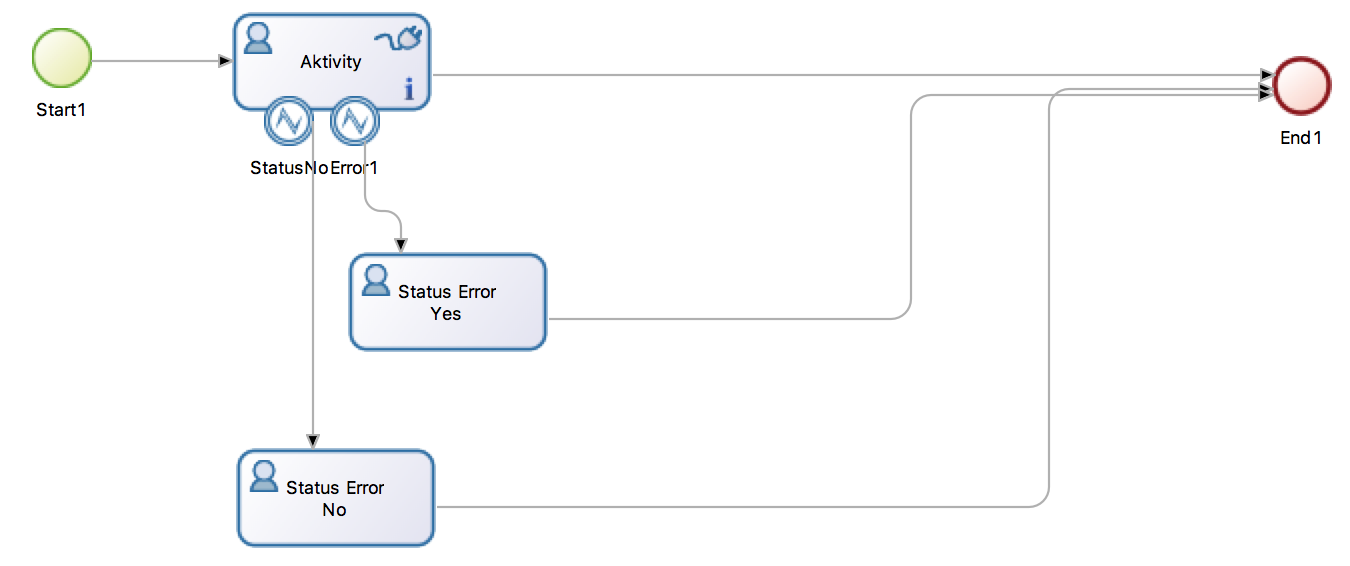
and validate it with post processors
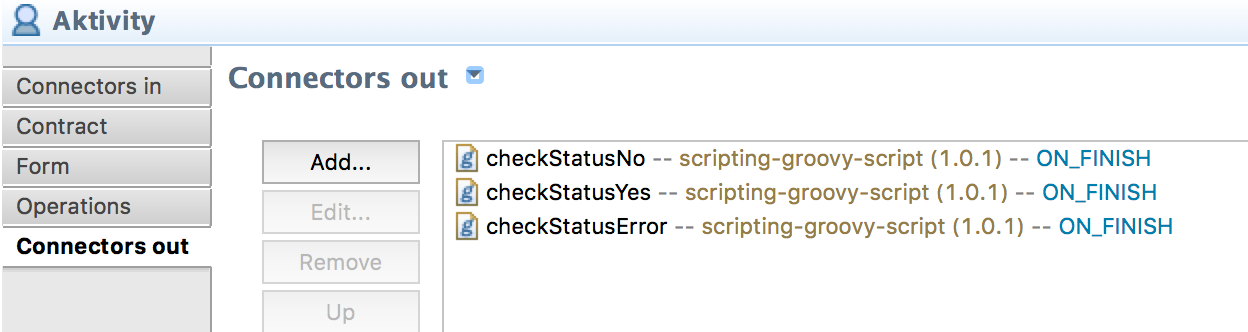
The processors are very simple, e.g 'checkStatusNo':
In this way processes are more robust, customers are happier and the visual representation is clearer. It's a win-win situation ;-)
Download the sample process.
The focus should be on maintenance and most of all on the customers using the system. Customers don't want to reinitialize a process every time an error occurred. They want the maintainer to fix it and let the process flow. Maintainers don't want to have much work with processes running.
I want to show two very common scenarios that happen in real life:
- All processes are based on tasks using operations working over the network. Maybe sending mails using a database etc. A lost network connection (maybe only a segment) will cause a lot of tasks to fail and trigger the error handling.
- A user creates a process instance and inserts data that's simply wrong. But the data can only be validated later in the flow. For example a wrong customer or contract id.
The second case shows a professional problem. We have the wrong information from the user. A task will fail and can't be done, even if it is retried. In this case a task error handler trail must be followed. And important: Different incidents could occur.
To implement this concept we changed the definition of automatic tasks with connectors. A connector should throw an exception if something technical went wrong. This exception should force the task to change its status to 'failed'. In this case we can retry the task if the technical problem is solved.
Next we check the return values of the connector. If something professional went wrong the returned data should contain such information, like "returncode=-5" or empty values "customerId=". Small post processor scripts can check the data and fire error handlers to jump into another part of the process.
The following example shows the behavior. I used a manual task to insert the 'returned data'
and validate it with post processors
The processors are very simple, e.g 'checkStatusNo':
if (status.equals("no"))
  throw new Exception("status is no");
The 'checkStatusError' script will change the status of the task to 'failed'. It's the situation of a technical failure.In this way processes are more robust, customers are happier and the visual representation is clearer. It's a win-win situation ;-)
Download the sample process.